October 22, 2026
Remote & Field Attendance: A Complete Small Business Guide
Why Attendance Matters More Than Ever for Remote and Field Teams
When your workforce is scattered across homes, job sites, or coffee shops, the traditional punch‑clock disappears. Without a reliable way to capture when employees start, pause, and finish work, small businesses face hidden costs: payroll errors, untracked overtime, and the risk of “buddy‑punching” (one employee clocking in for another). A systematic attendance solution gives you real‑time visibility, ensures compliance with labor laws, and builds trust between managers and staff.
According to industry research, manual attendance processes can increase payroll errors by up to 40 % and waste countless administrative hours. In contrast, cloud‑based attendance platforms that integrate with payroll can reduce those errors by as much as 30 % while freeing HR teams for strategic work.
Core Challenges of Remote & Field Attendance
- Location verification: How do you know a remote worker is actually at the job site and not simply logging hours from home?
- Time‑zone coordination: Distributed teams may span multiple zones, making “9‑to‑5” definitions impractical.
- Connectivity gaps: Field staff often work in areas with spotty internet, requiring offline punch‑in capabilities.
- Privacy concerns: GPS tracking can feel intrusive; policies must balance accountability with employee trust.
- Integration complexity: Attendance data must flow seamlessly into payroll, accounting, and HR systems to avoid double‑entry.
Addressing each of these pain points starts with a solid attendance policy, followed by the right technology stack.
Step 1: Draft a Remote Attendance Policy That Sets Clear Expectations
A policy is the foundation. It should answer the twelve core elements highlighted in leading attendance guides: purpose, scope, work‑hour definitions, approved tracking methods, break rules, overtime handling, leave request process, emergency absences, data privacy, reporting frequency, disciplinary actions, and reward mechanisms.
Key considerations for small businesses:
- Define core hours or “core windows”: If you need overlapping collaboration time, spell out a window (e.g., 10 am‑2 pm GMT) rather than a strict start time.
- Allow flexible start/end times: Let employees log actual start/end in the system, as long as they meet weekly hour requirements.
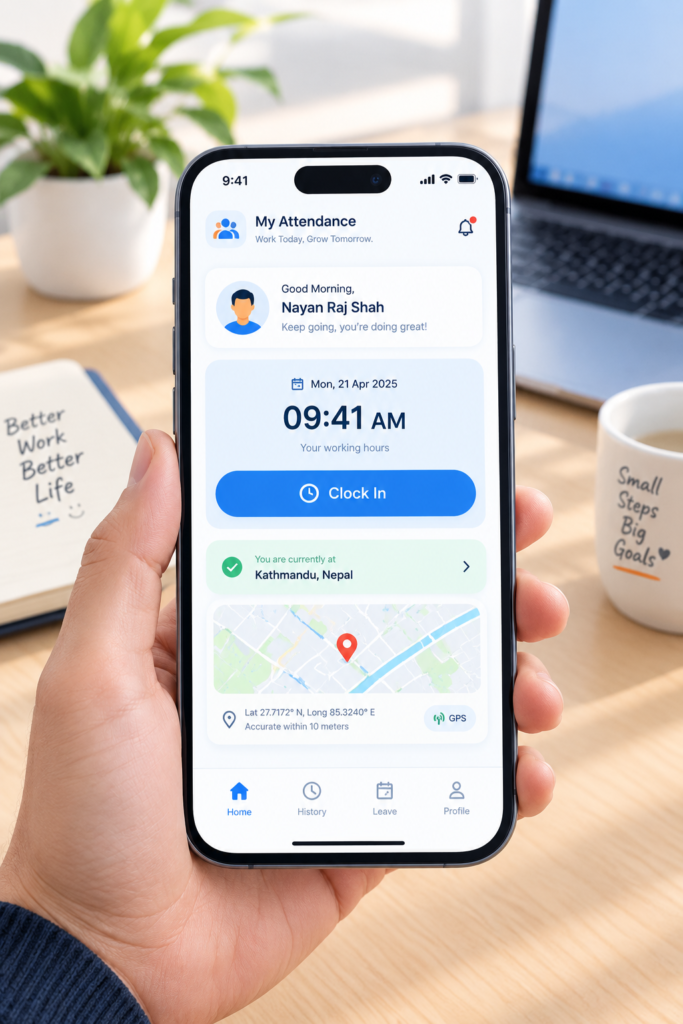
- Specify the tracking tool: Choose a mobile app that supports GPS or selfie verification. For example, Attenzo’s Field Staff Attendance via Selfie + GPS (No Biometric) offers a low‑cost way to confirm presence without expensive hardware.
- Address privacy: Explain what location data is collected, how long it is stored, and who can view it. Reference your Privacy Policy for transparency.
- Outline consequences: Clearly state disciplinary steps for missed punches or falsified logs, and highlight bonuses for perfect attendance.
Once the policy is written, share it via a self‑service portal—many attendance platforms embed a “policy hub” where employees can review and acknowledge the rules.
Step 2: Choose the Right Technology Stack
When evaluating software, focus on features that directly solve the challenges listed earlier. Below is a checklist of must‑have capabilities for small businesses:
- Mobile‑first interface: iOS/Android apps with intuitive clock‑in/out.
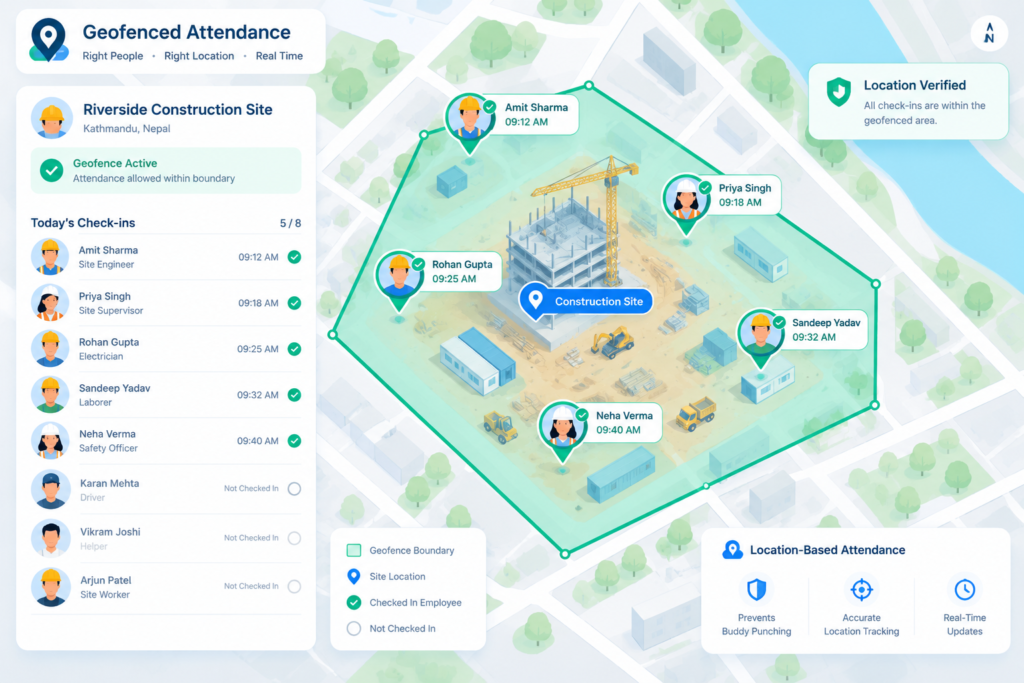
- GPS & geofencing: Ability to create virtual boundaries (geofences) around job sites, automatically validating punch‑ins. See Attenzo’s Geofence Attendance: How It Stops Home Punch‑Ins for a practical example.
- Offline punch support: Stores timestamps locally and syncs when connectivity returns.
- Selfie or QR‑code verification: Adds a layer of identity confirmation without costly biometric hardware.
- Integration with payroll/accounting: Direct export to QuickBooks, Xero, Gusto, or ADP.
- Automated alerts & reminders: Push notifications for missed punches, overtime thresholds, or upcoming leave.
- Reporting & analytics dashboard: Real‑time visibility of attendance patterns, location heat‑maps, and overtime costs.
- Scalable pricing: Free tier or low‑cost plans (e.g., up to 50 users free with Connecteam, free basic plan from Homebase).
Popular options that meet most of these criteria include:
| Software | Key Remote Features | Free / Low‑Cost Tier | Typical Price (per user/month) |
|---|---|---|---|
| Homebase | Mobile time clock, GPS, photo verification, payroll sync | Free basic package (up to 5 users) | Free – $14 for premium |
| Connecteam | GPS, selfie check‑in, offline mode, team chat | Free up to 30 users | $29 for 30 users |
| Clockify | Free time‑sheet, project linking, Google Calendar sync | Free unlimited users | $3.99 per user for advanced reports |
| Hubstaff | GPS tracking, activity monitoring, productivity insights | Free 1‑user trial | $5‑$12 per user |
| Attenzo | Selfie + GPS, geofence, leave management, templates | Free trial; flexible pricing for SMBs | Custom, typically $3‑$6 per user |
For a small business on a shoestring budget, starting with a free tier (e.g., Homebase or Clockify) and scaling as you add more field staff can keep costs below $5 per employee per month.
Step 3: Implement the System in Four Phased Steps
- Pilot with a core team: Choose 5‑10 employees across office, remote, and field roles. Gather feedback on UI, GPS accuracy, and notification preferences.
- Configure geofences and verification rules: Define site boundaries (e.g., a 100‑meter radius around a warehouse). Enable selfie verification for high‑risk roles where GPS alone may be spoofed.
- Train staff via self‑service tutorials: Record short videos showing how to clock in, request leave, and view their own logs. Use the free templates from Attenzo’s Free Employee Attendance Templates as hand‑outs.
- Integrate with payroll: Map the attendance fields (regular hours, OT, PTO) to your payroll software. Run a parallel payroll cycle (manual vs. automated) to validate accuracy before full roll‑out.
During the pilot, monitor two metrics closely: punch‑in accuracy (percentage of timestamps within geofence) and administrative time saved (hours per week reduced from manual entry).
Step 4: Ongoing Management & Best Practices
Even after a successful launch, continuous refinement keeps the system effective:
- Weekly data reviews: Spot trends such as chronic late arrivals or overtime spikes. Address the root cause—maybe a scheduling conflict or unclear policy.
- Monthly recognition program: Reward perfect‑attendance employees with a small gift card or extra PTO. Research shows recognition can triple positive outcomes.
- Quarterly policy audit: Update the attendance policy to reflect new regulations (e.g., overtime thresholds) and any changes in remote‑work norms.
- Privacy check‑ins: Periodically remind staff why GPS data is collected and allow them to view their location history.
- Leverage analytics dashboards: Use heat‑maps to optimize route planning for field crews, reducing travel time and fuel costs.
Most platforms also let managers set automatic alerts for irregular patterns—such as an employee clocking in from two distant locations within a short interval—which helps prevent buddy‑punching without invasive monitoring.
Step 5: Ensure Compliance with Labor Laws and Payroll Accuracy
Small businesses must stay compliant with the Fair Labor Standards Act (FLSA), local overtime rules, and record‑keeping mandates. Automated attendance systems help by:
- Capturing exact start/end times and break durations.
- Calculating overtime automatically based on configured thresholds.
- Storing records for the legally required period (typically three years).
- Generating audit‑ready reports that can be exported to Excel or PDF for inspection.
Integrating attendance data with payroll software eliminates manual transcription errors—a common source of costly compliance violations.
Case Study Snapshot: A Small Construction Firm Reduces Payroll Errors by 35 %
Acme Builders, with 22 field workers and 5 office staff, struggled with “buddy‑punching” and missed overtime calculations. After adopting Attenzo’s selfie‑plus‑GPS solution and configuring geofences around each job site, they achieved:
- 96 % on‑site verification for field punches.
- 35 % reduction in payroll processing time (from 12 hours to 8 hours per week).
- Zero overtime disputes in the first quarter after implementation.
The firm also rolled out a monthly “Perfect Attendance” award, boosting morale and reducing unscheduled absences by 18 %.
Putting It All Together: A Checklist for Small Business Owners
- Write a clear remote attendance policy (12 core elements).
- Select a mobile‑first, GPS‑enabled platform that offers a free or low‑cost tier.
- Configure geofences and selfie/QR verification for field staff.
- Run a pilot, gather feedback, and refine UI settings.
- Integrate attendance outputs with payroll (QuickBooks, Xero, etc.).
- Train employees using free templates and short video demos.
- Establish weekly review meetings and a recognition program.
- Audit compliance quarterly and update the policy as needed.
By following these steps, small businesses can turn attendance from a compliance headache into a strategic advantage—improving productivity, safeguarding against fraud, and ensuring every hour worked is paid accurately.
Final Thoughts
The rise of remote and field work has made traditional time‑cards obsolete. Modern attendance solutions—combining mobile apps, GPS geofencing, selfie verification, and seamless payroll integration—give small businesses the data and confidence they need to manage dispersed teams effectively. Investing time now to build a solid policy, select the right technology, and train your staff will pay dividends in reduced errors, happier employees, and clearer insight into how your workforce truly operates.