October 5, 2026
Field Staff Attendance via Selfie + GPS (No Biometric)
Why Traditional Biometric Machines Fail for a Mobile Workforce
Fingerprint scanners, iris readers, and other fixed‑point biometric devices were designed for static office environments. They work well when every employee walks through a single entrance each day. Field staff, however, operate across dozens of client sites, remote villages, or moving job‑sites. Deploying a physical terminal at each location quickly becomes cost‑prohibitive and logistically impossible.
Beyond the hardware expense, biometric machines demand regular maintenance, power supply, and network connectivity. In rural construction zones or on‑site service calls, these conditions are rarely guaranteed. The result is a high‑error attendance record, missed punches, and a cascade of payroll disputes.
Enter the selfie + GPS method. By leveraging the smartphone every field employee already carries, companies can capture a timestamp, exact latitude/longitude, and a live facial image—all without installing a single piece of hardware.
Core Components of a Selfie‑GPS Attendance System
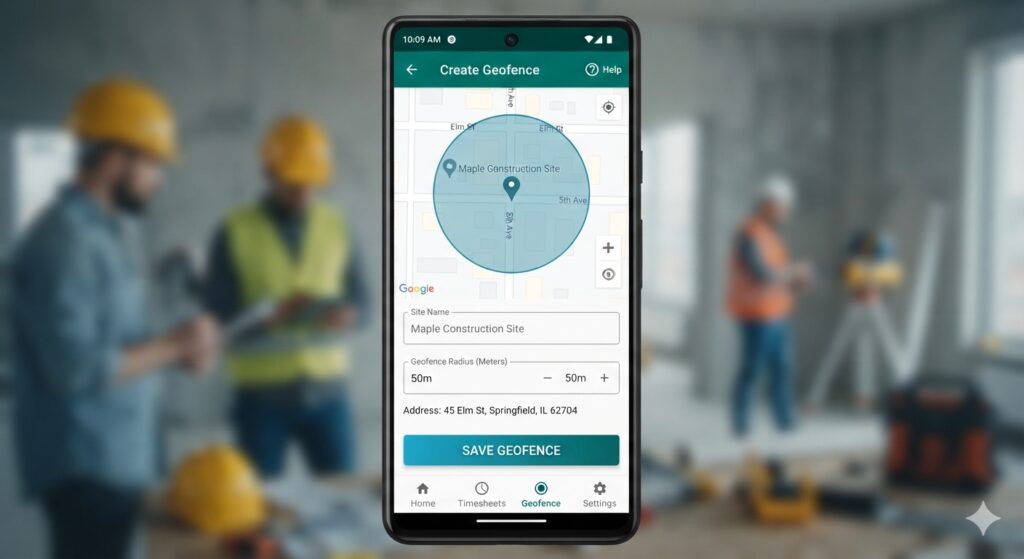
- Geofencing: A virtual perimeter (typically 50‑200 m) created around each job site. The system only accepts a punch when the device’s GPS falls inside the fence.
- Selfie Verification: The employee captures a live photo at the moment of punch‑in/out. Advanced apps run server‑side liveness detection and face‑recognition against a pre‑registered profile, thwarting buddy‑punching.
- Offline Mode: In areas with poor signal, the app stores the timestamp, GPS coordinates, and selfie locally. Once connectivity returns, data syncs automatically, preserving a tamper‑proof audit trail.
- Payroll Integration: Attendance logs flow directly into HRMS modules, calculating shifts, overtime, and deductions without manual entry.
Step‑by‑Step Guide to Implementing the Method
1. Choose a Mobile Attendance Platform
Many vendors now offer a ready‑made solution. When evaluating, look for:
- Built‑in geofencing with configurable radius.
- AI‑powered selfie verification that includes liveness checks.
- Offline data queuing and automatic sync.
- Seamless export to payroll systems or to Free Employee Attendance Templates for custom reporting.
- Transparent pricing – consider the Free vs Paid Attendance Software article for cost‑benefit analysis.
2. Register Employees and Capture Facial Profiles
During onboarding, each worker takes a high‑quality selfie that the system stores as the reference image. Most apps verify the photo with multiple angles and lighting conditions to improve match accuracy. This step replaces the fingerprint template that would normally be stored on a biometric terminal.
3. Define Geofences for Every Worksite
Using the admin console, draw circles (or polygons for irregular sites) around each client address, warehouse, or construction zone. Set the acceptable radius—50 m for tight indoor locations, up to 200 m for open‑air sites where GPS drift is common.
Optionally, you can assign different shift rules to each geofence, such as mandatory check‑in windows or overtime alerts.
4. Train Field Staff on the Check‑In Workflow
The typical flow takes less than five seconds:
- Open the attendance app.
- Slide to “Clock‑In”. The app instantly grabs the GPS fix.
- Take a quick selfie. The app validates liveness (blink or head turn) and matches against the stored profile.
- If both location and face checks pass, the system records the punch; otherwise, an error prompts the user to retry.
Most solutions also provide a “Clock‑Out” slide with the same verification steps, ensuring a complete work‑hour record.
5. Monitor Attendance in Real Time
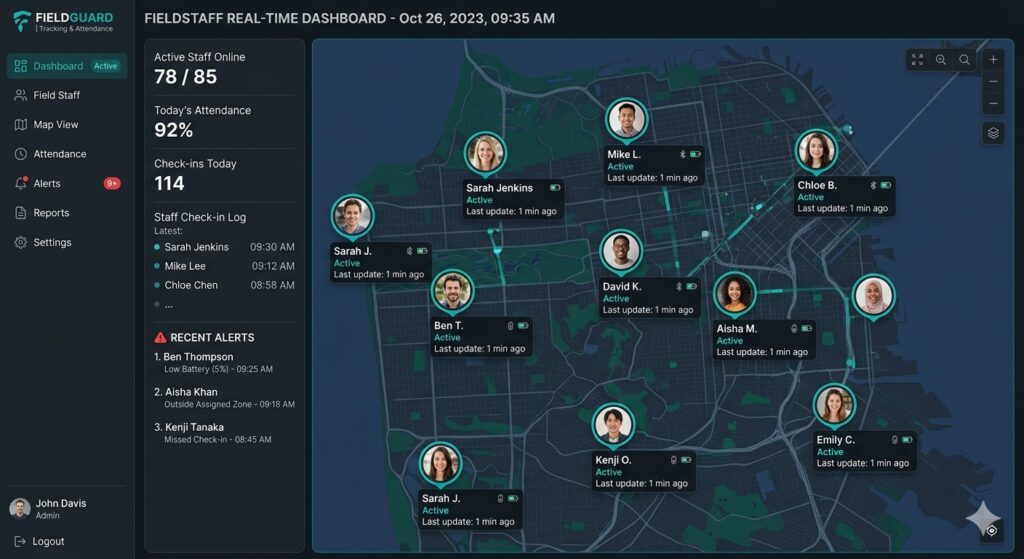
Managers receive a live map view—exactly what is shown in [IMAGE_2]—showing who is on site, who is late, and who is out of zone. Instant push alerts can be configured for missed punches or geofence breaches, allowing super‑visors to intervene before payroll errors accumulate.
6. Handle Offline Punches Gracefully
When a technician works in an area without cellular coverage, the app queues the punch. Once back online, the server verifies the stored GPS timestamp against the device’s internal clock to prevent manipulation. Most platforms flag any offline punch that exceeds a pre‑set duration (e.g., 30 minutes) for manager review.
Combatting Attendance Fraud without a Fingerprint Scanner
Buddy punching—where one employee clocks in for another—has long plagued traditional systems. The selfie component alone eliminates most of this risk, but savvy fraudsters may attempt GPS spoofing or reuse old photos. Here are layered defenses:
- Geofence Enforcement: Punches are rejected if the GPS coordinate falls outside the defined radius, cutting down proxy check‑ins from nearby cafés.
- Liveness Detection: AI checks for eye blink, head movement, or subtle lighting changes, preventing static image reuse.
- Device Binding: The app can be locked to a specific device ID, so an employee cannot simply lend their phone to a colleague.
- Audit Trails: Every punch logs device ID, GPS coordinates, and a thumbnail of the selfie. Managers can review suspicious patterns—see the Buddy Punching article for more on cost impact.
Combined, these measures deliver fraud reduction rates reported as high as 95‑99% in real‑world case studies.
Integrating Attendance Data with Payroll and HR
Once a punch is validated, the timestamp, location, and employee ID are stored in a cloud database. Most platforms offer native connectors to popular payroll engines (e.g., QuickBooks, Zoho Payroll) or export CSV/Excel files that can be imported into existing systems.
For businesses using Attenzo, you can map the exported data directly to the Employee Attendance Register Format for seamless reporting. The same data can populate the free attendance sheets for managers who prefer a spreadsheet view.
Choosing the Right App for Your Business
Below is a quick comparison of popular solutions, distilled from industry research:
| App | Key Features | Offline Support | Pricing (per user / month) |
|---|---|---|---|
| Jibble | Selfie + GPS, real‑time map, unlimited geofences | Yes | Free tier unlimited users; paid plans start at $1.99 |
| Truein | AI liveness detection, anti‑spoofing, QR fallback | Yes | ₹150‑₹400 |
| Connecteam | Geofencing, shift scheduling, dashboards | Only on higher tier | From $2 |
| Shiftelio | Offline queue, live GPS, custom alerts | Yes | ₹120‑₹350 |
All of these eliminate the need for a physical biometric terminal, but your choice should hinge on three factors: number of sites (geofence limits), offline reliability, and total cost of ownership.
Best Practices for a Smooth Rollout
- Pilot with a Small Team – Test the workflow on one region or project before organization‑wide deployment.
- Communicate Privacy Policies – Explain why GPS and selfie data are collected, referencing local labor regulations (e.g., India’s Labour Act).
- Provide Backup Devices – For employees whose phones die or break, keep a spare device pre‑loaded with the app.
- Set Clear Shift Windows – Define early‑arrival and late‑exit buffers to avoid false‑negative punches due to GPS drift.
- Review Alerts Daily – Managers should act on geofence breach notifications to keep compliance high.
Quantifiable Benefits: What the Numbers Say
Companies that switched from fingerprint terminals to selfie‑GPS solutions reported:
- Attendance accuracy improvement from ~85% to >99%.
- Reduction in payroll errors by up to 95%, saving an average of 3% of wage bill per month.
- Hardware cost elimination – roughly $50‑$200 per terminal, multiplied by the number of sites.
- Time saved on manual reconciliation – up to 40 hours per month for a 50‑person field team.
These figures underline how a software‑only approach can transform the HR function from a cost center into a strategic enabler.
Conclusion: A Future‑Ready Attendance Strategy
Tracking field staff attendance no longer requires bulky biometric machines. By harnessing the ubiquitous smartphone, a simple selfie, and precise GPS verification, businesses gain real‑time visibility, slashed fraud, and seamless payroll integration—all at a fraction of the traditional hardware cost.
Implement the steps outlined above, choose a platform that matches your geographic and operational complexity, and soon you’ll have a reliable, scalable attendance system that moves with your workforce.