September 14, 2026
Free vs Paid Attendance Software: What Small Businesses Need
Why Attendance Software Matters for Small Businesses
Accurate time‑keeping used to be a manual, paper‑heavy process that swallowed hours of HR time and invited costly errors. Today, a robust attendance system does more than capture clock‑ins; it integrates with payroll, enforces labor‑law compliance, and provides actionable insights into workforce productivity. For a small business—whether a boutique café, a field‑service contractor, or a remote tech startup—these capabilities can be the difference between smooth payroll runs and legal headaches.
Understanding the Free Tier Landscape
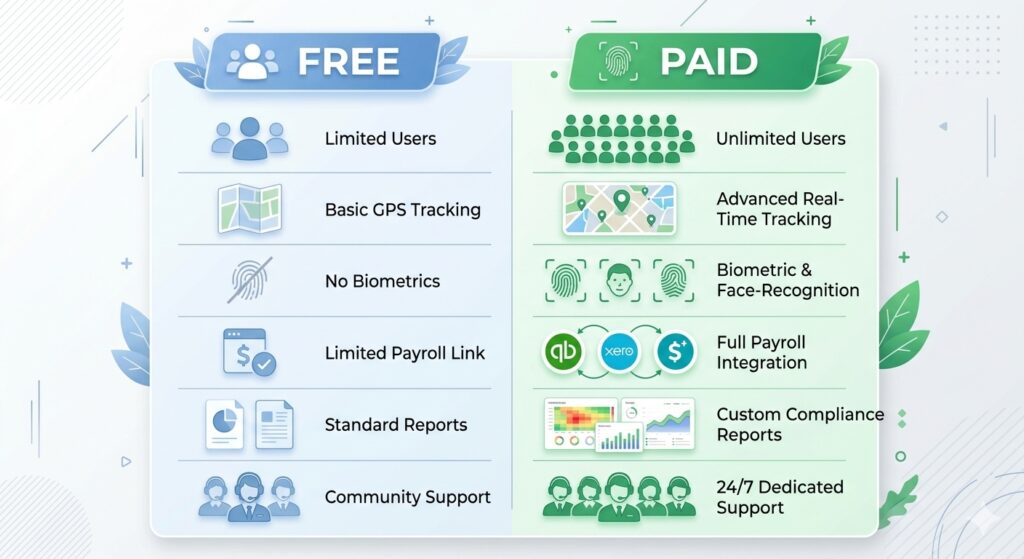
Many vendors offer a perpetual free plan to attract startups and test‑driven buyers. The most common constraints are:
- User caps: 5‑10 employees per account (e.g., OfficePortal, Zoho People).
- Location limits: Only a single site can be tracked, making multi‑location expansion painful.
- Feature restrictions: No GPS/geofencing, biometric verification, or advanced overtime rules.
- Reporting limits: Basic daily summaries but no department‑level costing or long‑term data retention.
Tools such as Attenzo’s free attendance & leave management and Open Time Clock break the mold by offering unlimited employees with core clock‑in, shift configuration, and basic dashboards—yet they still charge for add‑ons like geofencing or payroll sync.
Free plans are valuable for:
- Testing the attendance workflow before committing funds.
- Teams under five members that only need basic check‑in/out.
- Businesses that already handle payroll manually and don’t need automated export.
When a company outgrows these thin limits, the transition to a paid tier can feel like a migration project.
Paid Plans: What You Gain Beyond the Free Limits
Paid attendance solutions remove most of the caps mentioned above and layer in capabilities that directly affect compliance, productivity, and ROI:
Unlimited Users & Multi‑Location Support
Platforms such as uAttend, Deputy, and Workstatus let you add employees and sites without per‑user surprises. For a retail chain with three stores, this means a single admin console instead of three fragmented setups.
Advanced GPS & Biometric Verification
Geofencing prevents “buddy punching” (the practice of one employee clocking in for another). Facial recognition or fingerprint scanners add an extra layer of confidence, especially in high‑risk industries like security or construction.
Compliance‑Ready Features
Automatic overtime calculation, state‑specific break rules (e.g., New York’s Spread‑of‑Hours), and audit‑ready logs keep you on the right side of the FLSA. Several vendors also generate pre‑populated labor‑law reports that can be handed to auditors.
Deep Payroll Integrations
Seamless export to Gusto, Paychex, QuickBooks Payroll, or even bespoke payroll engines eliminates the manual spreadsheet step that can cost 24–36 HR days per year for a 25‑person team (see research #9). Integration also reduces “ghost hours” that lead to over‑payments or under‑payments.
Robust Reporting & Analytics
Paid tiers often include department‑level labor costing, overtime trends, and productivity heat‑maps. With this data, a small business can identify overtime spikes, adjust shift patterns, and ultimately lower labor expenses.

Industry‑Specific Needs: One Size Does Not Fit All
While the core clock‑in/out function is universal, the surrounding features vary by vertical:
- Restaurants: Tip tracking, shift differentials, and rapid schedule changes.
- Field Service: GPS‑verified check‑ins, mileage capture, and offline sync for low‑connectivity zones.
- Healthcare: Shift hand‑over notes, compliance with 12‑hour break rules, and secure biometric data handling.
- Construction: Tool‑checkout integration and site‑specific safety briefings.
Choosing a system that natively supports your industry cuts the need for costly customizations. For example, Deputy shines for retail and restaurant scheduling, while Jibble’s robust GPS and facial recognition are a natural fit for field crews.
Cost vs. Value: The ROI Equation
It’s tempting to compare headline prices—$0 vs. $4 per user—but the true cost picture includes hidden labor, compliance risk, and data migration expenses. Consider a 25‑person agency:
- Manual timesheets take roughly 1 hour per week for each manager to verify (≈$30/hr). That’s $750 per month.
- A paid attendance plan at $10 per user costs $250 per month.
- The net saving is $500/month, or $6,000 a year, not to mention the reduced risk of overtime lawsuits.
If a free plan forces you to export CSVs, clean data, and manually calculate overtime, those hidden hours quickly eclipse the $0 software price tag.
Scalability and Migration Pain Points
Many small businesses start with a free tier and later discover that historical attendance data does not migrate cleanly to a paid environment. Vendors differ in how they handle this:
- Some (e.g., OfficePortal) provide a CSV export that can be re‑imported but lack built‑in audit logs.
- Others (e.g., SnapHRM) lock historic data behind a paid tier, encouraging early upgrades.
When planning a switch, ask these questions:
- Is data export format compatible with the target system?
- Will employee IDs remain consistent to avoid payroll mismatches?
- Can the vendor assist with onboarding—many charge a migration fee.
Proactive planning reduces the risk of “lost records” that could trigger compliance violations.
Decision Framework for Small Business Owners
Use the following checklist to decide whether a free or paid solution is the right fit:
- Team size: ≤5 employees? Free tier may suffice.
- Location model: Single office vs. multiple sites or field workers? Paid plans often include multi‑location and GPS.
- Compliance needs: Overtime rules, break tracking, audit logs? Paid plans typically cover them.
- Payroll integration: Do you use Gusto, QuickBooks, or a custom payroll engine? Look for native connectors.
- Growth horizon: Anticipate adding >10 users or new locations in the next 12 months? Choose a platform that scales without steep migration costs.
If the answer to any of the above is “yes,” a paid tier becomes an investment rather than an expense.
Real‑World Example: From Free to Paid in Six Months
Acme Landscaping started with a free tier of Jibble for 8 crew members. The app handled GPS punch‑ins well, but the team quickly needed:
- Automated overtime alerts (state law requires overtime pay after 40 hrs/week).
- Payroll export to QuickBooks.
- Monthly labor‑cost reports for each job site.
After a month of manual workarounds, Acme upgraded to Jibble’s paid plan at $4 per user. Within two weeks, the payroll export was live, overtime alerts stopped costly manual calculations, and the manager saved an estimated 12 hours per month—an ROI of over 200% in the first quarter.
Stories like this illustrate why the “free is forever” promise can be misleading for growing businesses.
How Attenzo Fits Into the Equation
Attenzo offers a truly free attendance and leave management module that includes unlimited users, mobile check‑ins, and a basic dashboard—perfect for a team under 10 that wants to test the workflow without any cost. When you outgrow the free feature set, Attenzo’s paid add‑ons (geofencing, advanced reporting, payroll sync) can be activated without data migration, because the core platform remains the same. Read our deep dive on buddy punching to see how biometric verification can protect your bottom line.
Interested in a hands‑on trial? Create your organization for free and explore the dashboard today.
Conclusion: Choose the Solution That Grows With You
Free attendance software is an excellent entry point for micro‑teams or for businesses that want to test a concept. However, as soon as you need multi‑location tracking, compliance automation, or seamless payroll integration, the hidden costs of manual work and data migration outweigh the $0 price tag. Paid plans provide scalability, audit‑ready records, and industry‑specific features that protect small businesses from costly errors and legal exposure.
Start with a free tier to validate the workflow, then map your growth milestones against the checklist above. When you reach the point where the free plan becomes a constraint, transition to a paid plan—ideally one that shares the same data backbone to eliminate migration headaches. By aligning the software choice with your operational reality, you ensure that attendance management becomes a catalyst for efficiency, not a budget drain.
For more insights on optimizing workforce management, visit our Attenzo Blog or log in to your dashboard at Attenzo Login.