October 24, 2026
Leave Management for Small Teams: Ditch Spreadsheets Today
The Hidden Costs of Spreadsheet Leave Tracking
Most small businesses begin with a simple Excel or Google Sheet to track vacation, sick days, and other time‑off types. At first it feels cheap and flexible, but research shows that once a team grows beyond 10‑15 employees the spreadsheet becomes a liability. Manual entry leads to stale balances, broken accrual formulas, and no audit trail. A single typo can cause payroll errors that cost both time and money.
According to industry studies, HR managers spend 4–6 hours each week updating spreadsheet leave records – that adds up to over 200 lost hours a year. Errors in formulas can silently distort statutory deductions, exposing companies to compliance risk. And because spreadsheets lack permissions, anyone can edit a balance, making it impossible to prove who approved a request.
Beyond the administrative burden, spreadsheets hinder visibility. Managers must email back‑and‑forth to confirm whether a colleague is already off, or they manually colour‑code cells to avoid double‑booking. The result is a chaotic mix of emails, version‑controlled files, and anxious employees waiting for approvals.
Bottom line: A spreadsheet‑only approach works for a handful of users, but it quickly erodes efficiency, accuracy, and compliance as your team expands.

Core Features Small Teams Need in a Leave Management Tool
When evaluating dedicated leave‑management software, focus on the features that directly replace the manual steps you currently perform in a spreadsheet.
- Automated Accruals & Carry‑over Rules – The system calculates earned leave based on hire date, contract type, and local statutory holidays in real time, eliminating manual VLOOKUPs.
- Self‑Service Portal – Employees can view balances, submit requests, and see approval status without emailing HR.
- Manager Approval Workflow – A clear, configurable chain (single‑level or multi‑level) ensures requests are routed to the right approver, with instant notifications via email, Slack or Teams.
- Real‑Time Calendar Integration – Approved time off automatically blocks out dates in Google Calendar, Outlook, or internal calendars, preventing double‑booking.
- Audit Trail & Compliance Reporting – Every request, approval, and balance change is logged, helping you meet legal requirements such as FMLA, Quebec statutory holidays, or UK employment law.
- Payroll Export – One‑click CSV or API export feeds accurate leave balances directly into your payroll system, removing duplicate data entry.
- Integrations with Communication Tools – Slack, Microsoft Teams, or WhatsApp bots let staff request leave where they already work.
Most of the leading tools can be set up in under a day, meaning you won’t lose weeks of productivity during the transition.
Top Affordable Leave Solutions for Teams Under 50
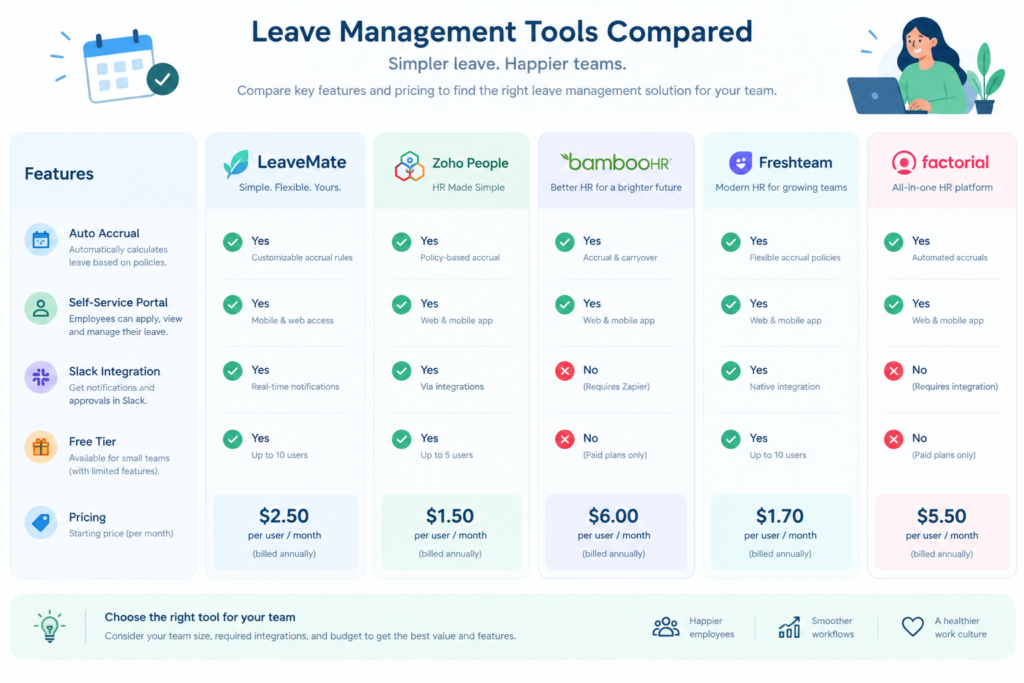
Below is a curated list of platforms that balance cost, ease of use, and the feature set small teams typically require. All of them offer free trials or free‑tier plans, so you can test before you commit.
| Tool | Free Tier / Starting Price | Key Strengths for Small Teams |
|---|---|---|
| LeaveBoard | Free up to 9 users | Simple card‑style dashboard, Slack & Google Calendar sync, unlimited leave types. Ideal for startups that want a cost‑free, no‑credit‑card solution. |
| Zoho People | $1.25 per user/month | Low‑priced core HR package, auto‑accruals, multi‑level approvals, mobile app, integrates with Zoho Payroll. |
| Vacation Tracker | From $1 per user/month (monthly minimum) | Calendar sync with Teams/Slack, one‑click approvals, policy templates for multiple locations. |
| TimeOff Management | $1.50 per user/month | Contextual manager view, CSV export, 30‑day free trial, no setup fee. |
| AttendanceBot | Free tier up to 5 users, then $2 per user/month | Slack/Teams bot for requests, real‑time balance updates, payroll‑ready exports. |
| PurelyHR | Free trial, then custom pricing | Rapid setup (hours), unlimited leave types, deep reporting, suitable when you anticipate fast growth. |
For teams that already use an attendance solution, consider tools that bundle time‑tracking with leave management. Attenzo’s remote‑field attendance guide explains how platforms like Desklog or AttendanceBot can combine shift logs and PTO in a single dashboard, removing the need for separate spreadsheets.
How to Choose the Right Tool for Your Team
Not every leave‑management system is a perfect fit for every small business. Use the following decision framework to narrow your options:
- Team Size & Growth Trajectory – If you currently have fewer than 10 employees, a free tier (LeaveBoard, Clockify) may suffice. For teams approaching 20‑30, look for scalable pricing (Zoho People, Vacation Tracker).
- Feature Prioritization – List the must‑have features: automated accruals, Slack integration, payroll export, custom holiday calendars. Eliminate tools missing any critical item.
- Integration Landscape – Does the tool sync with the calendar and payroll solutions you already use? For remote or field teams, GPS‑enabled attendance (see field staff selfie + GPS) can be a differentiator.
- Cost vs. Value – Compare total cost of ownership, including any hidden fees for extra leave types or premium support. The Free vs Paid Attendance Software article provides a useful cost‑benefit matrix.
- User Experience – Run a short pilot with a few employees. If the UI feels clunky, adoption will suffer regardless of price.
Implementing a Leave System Without Disruption
Switching from spreadsheets to a dedicated platform can be seamless if you follow a phased rollout:
- Data Audit – Export your existing leave balances and history as CSV. Clean any duplicate rows and verify accrual calculations.
- Parallel Run – For one payroll cycle, keep the spreadsheet as a backup while the new system handles new requests. Compare the exported reports to ensure balances match.
- Train Managers & Employees – Host a 30‑minute live demo, share quick‑start guides, and point staff to the self‑service portal.
- Set Up Notification Channels – Enable Slack or Teams alerts for request submissions and approvals so nothing falls through the cracks.
- Retire the Spreadsheet – Once the parallel run validates accuracy, archive the old sheet (read‑only) and lock it down.
Because most platforms provide CSV import tools, migration typically takes less than a day. The key is to involve both HR and finance early, ensuring payroll exports align with your existing payroll software.
Frequently Asked Questions
Can I still use Excel for reporting?
Absolutely. Most leave‑management tools let you export balances and leave history as CSV or Excel files. This gives you the flexibility to create custom dashboards while keeping the core workflow automated.
Do free plans offer audit‑trail capabilities?
Yes. Solutions like LeaveBoard and Clockify include basic audit logs (who requested, who approved, timestamps). If you need advanced compliance reporting, consider a paid tier that adds policy‑level audit reports.
How does a leave system integrate with payroll?
Most platforms generate a payroll‑ready file that maps employee IDs to accrued and taken leave. You can import this directly into payroll software or use an API for real‑time sync.
Is a dedicated leave tool worth it for a five‑person team?
For very tiny teams, a free spreadsheet may suffice, but the time saved on manual calculations and the professional impression of a self‑service portal often outweighs the negligible cost of a free tier. Plus, you future‑proof your process as you hire.
Conclusion
Spreadsheets are a tempting low‑cost start, but they quickly become a source of error, compliance risk, and wasted hours. Modern leave‑management platforms give small teams the automation, visibility, and auditability they need to grow without the spreadsheet‑induced chaos.
By identifying the core features you need, selecting a tool that fits your budget, and following a disciplined migration plan, you can transition in a single day and free up dozens of hours each year for strategic HR work.
Ready to say goodbye to messy spreadsheets? Explore a free trial of a tool that matches your team’s size and start tracking leave the smart way.